


![Kingston Educational Institute [KEI]](https://studyriserr.com/images/logo/171294406716552105746d819583c73a4fcba9ef9a542784d4c9.jpg)
![IIM Calcutta [IIMC]](https://studyriserr.com/images/logo/17048036751488950580d2.png)
![Global Institute of Science and Technology - [GIST], Nadia](https://studyriserr.com/images/logo/17129440661488628291c321e09e068c6ac2956042241987f838Logoyfv1hi9.jpg)
![Pioneer College of Management [PCM], Kolkata](https://studyriserr.com/images/logo/1712944066col7201.jpg)
![International Institute of Management Sciences [IIMS], Kolkata](https://studyriserr.com/images/logo/17129440611598692304logo.png)





![Budge Budge Institute of Technology [BBIT], Kolkata](https://studyriserr.com/images/logo/17129440541592134592bbitlogo.png)
![Seacom Skills University [SSU], Birbhum](https://studyriserr.com/images/logo/17129440541486354667xseacomskillsuniversitybirbhum55270.jpg.pagespeed.ic.Qt1JgoghYw9gNSKdI3Qx.jpg)
![College of Engineering And Management [CEM], Kolaghat](https://studyriserr.com/images/logo/1712944057148854482644444.jpg)




This year, NTA has simplified the registration process with Aadhaar-Based Autofill feature. In addition, several new updates have been introduced for JEE Main 2026. Check details below.
JEE Main 2026 brings major changes for you. For the first time, the exam will feature an on-screen calculator, along with new accessibility options and a screen magnifier to improve the test experience. JEE Main 2026 registration is currently underway, the application window remains active until November 27, 2025.
JEE Main 2026 exam is scheduled to take place from January 21 to January 30, 2026, with two daily shifts. The first shift will run from 09:00 AM to 12:00 Noon and the second shift will be conducted from 03:00 PM to 06:00 PM. Before exam you will receive your JEE Main 2026 admit card, which will contain complete details of your assigned exam date, shift, and centre.
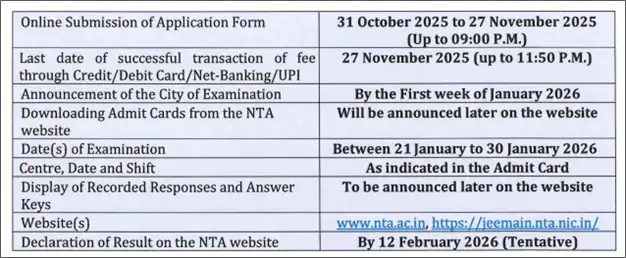
Image Credit: jeemain.nta.nic.in
What are the Major Changes Introduced in JEE Main 2026?
Check the following new updates introduced in JEE Main 2026:
- On-Screen Calculator: JEE Main 2026 exam will provide an on-screen calculator on your computer screen. It supports basic arithmetic operations like addition, subtraction, multiplication, and division, along with advanced functions such as square roots, percentages, and more. This feature will be available throughout the exam to help you perform calculations faster with more efficiency.
- Screen Magnifier: JEE Main 2026 computer-based test will include a screen magnifier to enhance visibility during the exam. You can drag your cursor over any section of the screen to enlarge it for easier viewing. With this feature, you can read questions and options clearly.
- Accessibility Mode: JEE Main 2026 exam will offer an accessibility option to enhance your user experience. This feature allows switching between dark mode and light mode, adjusting font size of on-screen text, and enabling a customizable cursor trail. These settings will help to navigate the exam interface according to individual needs during the exam.
Also Read
- JEE Main 2026 Registration is LIVE: Direct NTA Application Form Link Here; Check New Official Syllabus
- New Rules for JEE Main 2026: NTAs Essential Document Advisory and Paper Details
- JEE Main Eligibility Criteria 2026

Related News







Confused About Your Career?
Talk to an expert at Studyriserr






.png)





.jpg)

.webp)
.webp)

