


![SRM Institute of Science and Technology [SRM IST], Ramapuram](https://studyriserr.com/images/logo/1702724874SRM Ramapuram logo.jpg)
![Mount Carmel College [MCC], Bangalore](https://studyriserr.com/images/logo/1712129661MCC Bangalore Logo.jpg)

![Birla School of Management [BSM], Kolkata](https://studyriserr.com/images/logo/17129440681415702941BSM-Logo1.jpg)




![JB Institute of Hospitality Management [JBIHM], Kolkata](https://studyriserr.com/images/logo/17129440641606120454Logo.jpeg)
![Elitte College of Engineering [ECE], Kolkata](https://studyriserr.com/images/logo/17129440611486448334logo11.png)
![SRM Institute of Science and Technology [SRM IST], Vadapalani](https://studyriserr.com/images/logo/1702879472SRM Institute of Science & Technology Vadapalani campus logo.jpeg)
![Swami Vivekananda Institute of Management and Computer Science [SVIMCS], Kolkata](https://studyriserr.com/images/logo/171294406514889505056.jpg)




The official registration window for CAT 2026 is online. To initiate the process, you must create a unique profile by providing basic personal details, a valid email address, and a mobile number to complete the mandatory OTP verification and generate login credentials.

The Indian Institute of Management (IIM) Indore has officially started the Common Admission Test (CAT) 2026 registration process. The applications will be accepted until September 15, 2026. The computer-based CAT examination will take place on November 29, 2026, across approximately 170 test cities in three sessions, maintaining a 120-minute format split into 40-minute sections for Verbal Ability and Reading Comprehension, Data Interpretation and Logical Reasoning, and Quantitative Ability. For application, you must hold a Bachelor's degree with a minimum of 50 percent marks or equivalent CGPA, while a relaxed threshold of 45 percent applies to candidates from SC, ST, and PwBD categories. Students in their final year of graduation and professionals with qualifications like CA, CS, or ICWA can apply too.
| CAT Registration 2026 Direct Link |
| New Candidate |
| Candidate Login |
The application fee must be paid online using net banking, credit/debit cards, or UPI during the final submission step. Applicants should ensure all entered details are accurate, as changes cannot be made after final submission outside of the designated correction window later in September.
CAT Registration 2026 Process
The CAT registration process for the academic year 2026 is outlined below:
- Step 1: Go to the official CAT website at iimcat.ac.in.
- Step 2: Click on the "New Candidate Registration" tab and enter your basic details such as name, date of birth, email, and mobile number.
- Step 3: Complete the OTP verification sent to your phone and email to successfully generate your unique User ID and Password.
- Step 4: Log in to the application portal using your newly created credentials.
- Step 5: Fill out your personal details, contact information, and address accurately.
- Step 6: Enter your academic qualifications, including your Class 10, Class 12, and graduation marks or equivalent CGPA.
- Step 7: Input your work experience details (if applicable), including total duration and organization name, or skip this section if you are a fresher.
- Step 8: Select your preferred IIM programmes and choose up to five test cities in order of priority.
- Step 9: Upload scanned copies of your recent passport-size photograph, signature, and any applicable category, PwD, or EWS certificates.
- Step 10: Review the entire application carefully, as edits are restricted after submission.
- Step 11: Pay the applicable registration fee online using a credit card, debit card, net banking, or UPI.
- Step 12: Download and save a copy of the confirmation page and payment receipt for your future records.
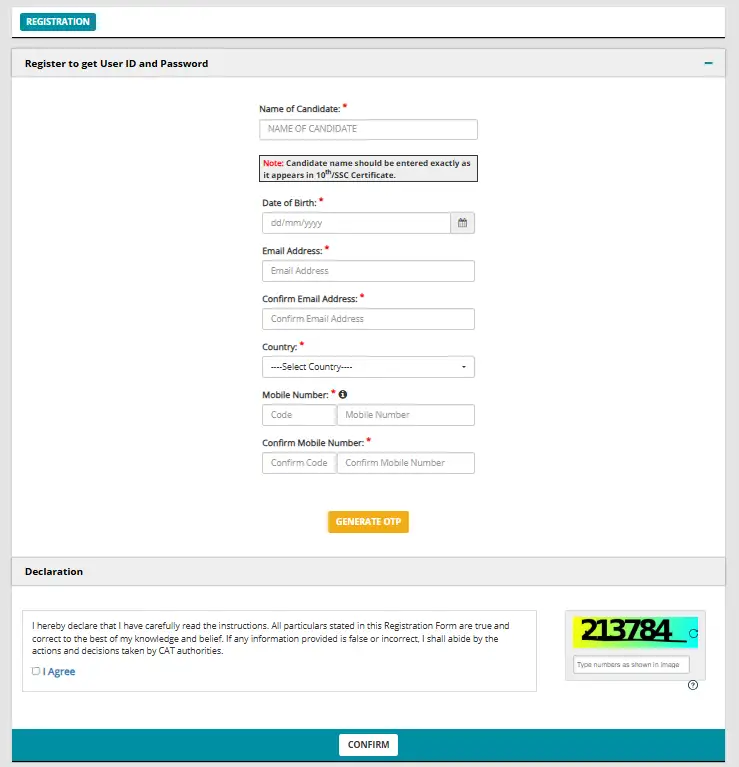
Source: CAT 2027 Registration Portal
What are the Application Fees for CAT 2027?
Category wise CAT 2026 fee structure is given below:
| Candidate Category | Revised Application Fee |
| General, EWS, and NC-OBC | ₹2,700 |
| SC, ST, and PwD | ₹1,350 |
How to Avoid Common Mistakes During CAT 2026 Registration Process?
To ensure your application is accepted without any technical rejections, be careful to avoid these frequent errors related to document uploads:
- Uploading a photograph that does not meet the exact dimensions of 1200 × 1200 pixels, exceeds the maximum file size of 80 KB, fails to use the required .jpg or .jpeg format, or has a resolution higher than 150 px/inch.
- Submitting a signature that does not match the specified dimensions of 80 mm × 35 mm or exceeds the 80 KB file size limit.
- Uploading category certificates in a non-PDF format or failing to include mandatory self-attestation.
Check: CAT 2026 Full Syllabus Released by IIM Indore

Recommended Web Browsers for CAT 2026 Application
For best possible and flawless application experience when filling out the CAT registration form, ensure you are using a supported browser version as below:
- Mozilla Firefox (versions 134 to 151)
- Google Chrome (versions 126 to 149)
- Microsoft Edge (versions 126 to 149)
CAT 2026 Registration: Professional Degree Details & Percentage Calculation
Candidates with professional qualifications (CA, CS, ICWA, FIAI) must select their degree in the CAT 2026 application and enter the aggregate percentage for their highest-scoring qualification. For candidates lacking a Bachelor's degree, completing at least one professional degree is mandatory. Convert CGPA to percentage using your institution's formula; if none exists, divide your CGPA by the maximum possible CGPA and multiply by 100. Note that original mark sheets are required during interviews.
CAT 2026: Selecting IIM Programmes
To select your IIM programmes during CAT 2026 registration, navigate to the "PROGRAMMES" tab and choose your preferred courses by checking either the "Select All" box to apply to every available program or individual checkboxes for specific courses. Next, set your preferred interview location for each selected course using the corresponding drop-down menus, and click "SAVE & NEXT" to preserve your choices and proceed to Section 5 for your Test City Preferences.
CAT 2026 Document and Image Upload Specifications
Before starting your CAT 2026 registration, ensure all required photograph, signature, and certificate files are scanned according to the following official parameters:
Passport Size Photograph
- File Format: JPG or JPEG only
- File Size: Maximum 80 KB
- Dimensions: Up to 1200 x 1200 pixels
- Resolution: Minimum 150 dpi (dots per inch)
- Background: Plain white background
- Recency: Must not be older than 6 months; face must be clearly visible
- Important Note: Retain identical physical prints of this uploaded photo, as you will need to affix one to your Admit Card on the exam date (November 29, 2026).
Scanned Signature
- File Format: JPG or JPEG only
- File Size: Maximum 80 KB
- Dimensions: Within 80 mm x 35 mm
- Resolution: Minimum 150 dpi; signature must be legible and clear
Category & Disability Certificates (If Applicable)
- File Format: PDF document only
- Applicable Documents: Valid EWS / NC-OBC / SC / ST Certificate or PwBD Certificate
CAT 2026 Form: No Changes Allowed Post-Payment
Once your online payment is successfully processed and the CAT 2026 application form is submitted, the window for modifications closes permanently, and no changes or edits can be made to any details. After submission, candidates will only be able to view, download, or print their finalized application form directly from their candidate dashboard.
Emergency Contact Requirement for CAT 2026 Registration
During the personal details section of the CAT 2026 application form, you are required to enter an emergency contact mobile number. This emergency number must be distinct from the primary phone number provided during initial registration. The conducting authorities advise applicants to supply a contact number of a parent, guardian, or close relative who can be contacted immediately in case of an emergency.
Related News








Confused About Your Career?
Talk to an expert at Studyriserr





.png)





.jpg)

.webp)
.webp)

