


![IIM Calcutta [IIMC]](https://studyriserr.com/images/logo/17048036751488950580d2.png)
![Krupanidhi College of Management [KCM], Bangalore](https://studyriserr.com/images/logo/1712062666Krupanidhi College of Management Logo.jpg)
![Mount Carmel College [MCC], Bangalore](https://studyriserr.com/images/logo/1712129661MCC Bangalore Logo.jpg)





![Burdwan Institute of Management & Computer Science [BIMS], Bardhaman](https://studyriserr.com/images/logo/1712944061139866853916457.JPG)
![Gouri Devi Institute of Medical Science and Hospital [GIMSH], Durgapur](https://studyriserr.com/images/logo/17129453361691555442Screenshotfrom20230809093645.png)
![Bankura Unnayani Institute of Engineering [BUIE], Bankura](https://studyriserr.com/images/logo/1725608843BUIE Logo.jpeg)




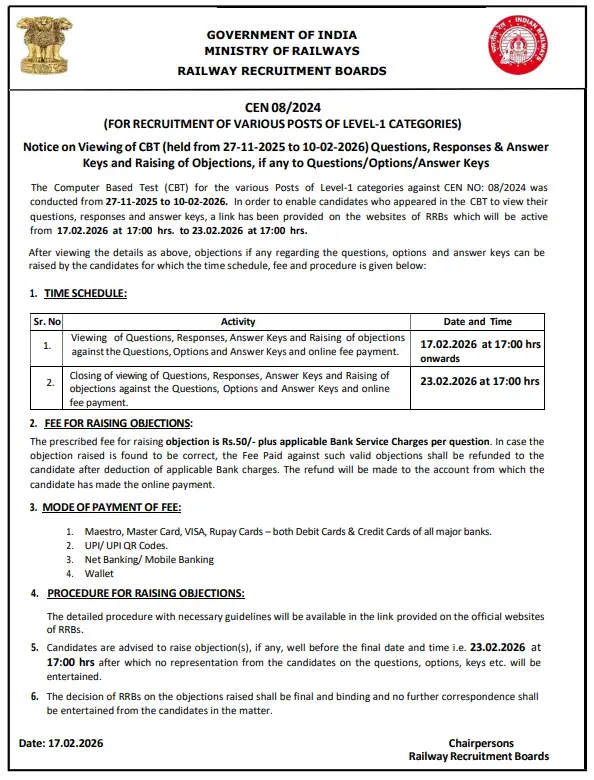
The Railway Recruitment Boards (RRBs) released the RRB Group D (CEN 08/2024) official answer keys, question papers, and candidate response sheets today, February 17. The exams concluded on February 10, 2026.
Theanswer key to the CBT exam link is updated on the official sites. The RRB Group D evaluated candidates across four key areas; General Science, Mathematics, General Intelligence & Reasoning, and General Awareness, totaling 100 questions. To ensure a level playing field across different exam shifts, RRB will apply a normalization scheme to determine the final merit list.
You can access them through regional RRB websites using your user ID and password to calculate their probable scores. An objection window is activate until February 23 (5:00 PM), allowing aspirants to challenge discrepancies for a fee (INR 50 per question). Final results, which will utilize a normalization scheme to ensure fairness across multiple shifts, are anticipated in March 2026. Those who successfully clear the Computer Based Test (CBT) will proceed to the next stage and receive their admit cards for the Physical Efficiency Test (PET) and subsequent Document Verification (DV).
How to Download Your RRB Group D 2026 Response Sheet?
To download RRB Group D response sheet, follow these steps:
- Visit the regional RRB site where you applied.
- Click the link for response sheet.
- Enter your Group D credentials.
- Access the "Candidate Response" tab to view your paper, then download or print it for score calculation.
Step-by-Step Guide to Raise Objections to the RRB Group D Answer Key 2026
These steps will help you to make an objection for your RRB Group D 2026 provisional answer key:
- Step 1: Go to the official website of the RRB region you applied to (e.g., RRB Chandigarh, RRB Mumbai) or the main portal at rrbcdg.gov.in.
- Step 2: Click the "CEN 08/2024: Viewing of Question Paper, Responses and Keys & Raising of Objections" titled link.
- Step 3: Enter your Group D Registration Number and Date of Birth/Password.
- Step 4: Your question paper, ID and the responses you marked will be displayed.
- Step 5: Select the specific Question ID from the drop-down menu. Choose the "Type of Objection" (e.g.: All options incorrect, Incorrect/Ambiguous question, Multiple correct answers, or Translation error).
- Step 6: You must upload a clear explanation and documentary proof (e.g.: a page from a standard textbook) to support your claim.
- Step 7: A fee + applicable bank charges must be paid online via Debit/Credit Card, Net Banking, or UPI.
- Step 8: Once the payment is successful, your objection will be formally recorded.
www.rrbkolkata.gov.in
Read Now: RRB Group D Pattern, Difficulty and Cutoff Analysis

Related News



Confused About Your Career?
Talk to an expert at Studyriserr






.png)





.jpg)

.webp)
.webp)

