


![Government College of Engineering and Leather Technology [GCELT], Saltlake](https://studyriserr.com/images/logo/1725350314GCELT Logo.png)
![Mallabhum Institute of Technology [MIT], Bishnupur](https://studyriserr.com/images/logo/17129440601419232016mit-logo1.jpg)

![Camellia Institute of Technology [CIT], Kolkata](https://studyriserr.com/images/logo/17129440541488523428Camelliait.jpg)
![Global Institute of Science and Technology - [GIST], Nadia](https://studyriserr.com/images/logo/17129440661488628291c321e09e068c6ac2956042241987f838Logoyfv1hi9.jpg)




![IBMR International Business School [IBMR-IBS], Bangalore](https://studyriserr.com/images/logo/17048139131584429079imbribs1.png)


![Institute of International Trade [IITRADE], Kolkata](https://studyriserr.com/images/logo/17129440661501741083logo.jpg)
![Swami Vivekananda Institute of Management and Computer Science [SVIMCS], Kolkata](https://studyriserr.com/images/logo/171294406514889505056.jpg)
![Government College of Engineering and Ceramic Technology [GCECT], Kolkata](https://studyriserr.com/images/logo/17129440571488627169c1.jpg)



IIT Roorkee has officially released the JEE Advanced 2026 admit cards today, May 11. Remember that the admit card is a mandatory document. Without it and a valid photo ID, entry to the testing center will be strictly prohibited. Check the mandatory hall instructions here.
The JEE Advanced 2026 admit cards have been officially released and are now available for download at jeeadv.ac.in. Candidates who qualified via JEE Main can access their hall tickets by logging in with their registration number and date of birth. Upon downloading, it is crucial to verify all personal details, as any discrepancies should be reported immediately to IIT Roorkee for rectification.
This official document is mandatory for entry into the JEE Advanced examination scheduled for May 17, which consists of two compulsory sessions: Paper 1 (9:00 AM to 12:00 PM) and Paper 2 (2:30 PM to 5:30 PM). Both papers will evaluate candidates across Physics, Chemistry, and Mathematics. Follow the admit card instruction while entering and inside the exam hall to avoid any disruption.
Key Information on the JEE Advanced 2026 Hall Ticket
Upon downloading your JEE Advanced admit card, meticulously verify the following personal and logistical data:
- Candidate Identification: Your full name, roll number, photograph, and digital signature.
- Examination Logistics: The specific address of your assigned exam center, along with the date and precise shift timings for both papers.
- Category Details: Your registration category and disability status (if applicable).
How to Download Your JEE Advanced 2026 Admit Card?
To access your hall ticket for the upcoming examination, follow these six steps on the official portal:
- Step 1: Open the JEE Advanced website at jeeadv.ac.in.
- Step 2: On the homepage, identify and click the prominent link labeled "JEE Advanced 2026 Admit Card."
- Step 3: Provide your specific JEE Advanced login details, including your registration number, date of birth, and either your registered mobile number or email ID.
- Step 4: Click the submit button to authenticate your details and enter the candidate portal.
- Step 5: Once the admit card appears on your screen.
- Step 6: Save the document as a PDF and print a hard copy, as this physical version is mandatory for entry into the examination hall.
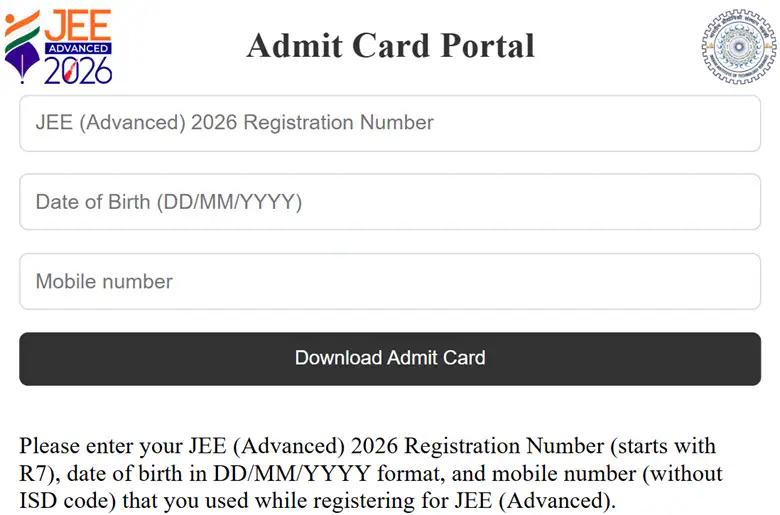
JEE Advanced Admit Card Login
If you notice any errors or mismatches in the information provided, you must contact the IIT Roorkee examination authorities immediately for rectification.

Related News





Confused About Your Career?
Talk to an expert at Studyriserr






.png)





.jpg)

.webp)
.webp)

