


![IIM Bangalore [IIMB]](https://studyriserr.com/images/logo/1705405112IIMB Logo.jpg)
![Swami Vivekananda University - [SVU], Kolkata](https://studyriserr.com/images/logo/17129450321679036648index.png)
![Guru Nanak Institute of Technology [GNIT], Kolkata](https://studyriserr.com/images/logo/170480369616240103946483578416130722721606796901116776487059456n.jpg)
![Mallabhum Institute of Technology [MIT], Bishnupur](https://studyriserr.com/images/logo/17129440601419232016mit-logo1.jpg)
![Bankura Unnayani Institute of Engineering [BUIE], Bankura](https://studyriserr.com/images/logo/1725608843BUIE Logo.jpeg)





![IBMR International Business School [IBMR-IBS], Bangalore](https://studyriserr.com/images/logo/17048139131584429079imbribs1.png)




TS POLYCET 2025 counselling for the internal sliding round is now underway, having commenced on August 2. Complete the option entry on the official website, tgpolycet.nic.in, by August 3. The seat allotment results will be announced on August 5. On the same day, candidates who have been allotted a new branch will need to download their new allotment order and report to that branch within their current college.
TS POLYCET 2025's internal sliding counselling process has begun today August 2. This allows candidates to select their preferences for a change of branch within the same college. The option entry window is open on the official website, tgpolycet.nic.in, and is managed by the Department of Technical Education (DTE), Telangana.
DIRECT LINK: TS POLYCET 2025 Internal Sliding Option Entry (ACTIVE) |
Students must use their login ID, hall ticket number, password, and date of birth to submit their choices by the August 3 deadline. Seat allotment will be based on factors like the candidate's rank, preferences, category, and seat availability. It is important to note that candidates who were allotted a seat in the final phase but did not report to the college are not permitted to participate in this round. TS POLYCET 2025 exam was successfully conducted on May 13.
TS POLYCET Internal Sliding Option Entry: How to Do?
To complete the TS POLYCET 2025 internal sliding option entry, you should follow these steps:
- Step 1: Navigate to the official website, tgpolycet.nic.in.
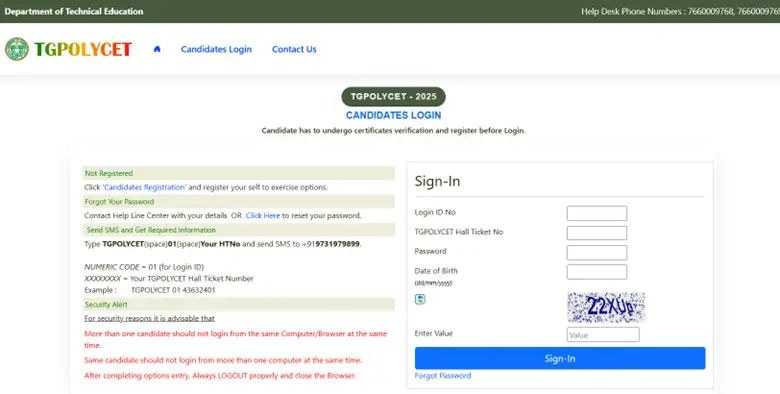
- Step 2: Locate and click on the "Candidates' Login" portal.
- Step 3: Sign in by providing their login ID, TG POLYCET hall ticket number, date of birth, and password.
- Step 4: After logging in, they can select their preferred branches from the options displayed, based on the current availability.
Read More:

Frequently Asked Questions
Ans: TS POLYCET 2025 Internal Sliding is a counselling process for candidates who want to change their branch within the same college. To participate, you need your Login ID, TS POLYCET hall ticket number, password, and date of birth for option entry. It's important to note that only candidates who reported to their allotted college in the final phase are eligible; those who did not are not permitted to participate. To maximize your chances of getting a preferred seat, you should fill out as many options as you can.
Ans: After certificate verification, you'll get a Login ID on your phone. It's a good idea to first fill out a Manual Option Entry Form from the website with your preferred institution, branch, and district codes. This helps prevent mistakes and saves time. Use this form as a guide to enter your options online.
Be sure to prioritize your choices carefully, as this order is a factor in seat allotment. You can edit your options multiple times before the deadline. Finally, print a copy of your saved options for your records.
Ans: To check your TS POLYCET seat allotment, follow these steps:
| Step | Action |
| 1. | Visit the official TS POLYCET counselling website. |
| 2. | Click on the "Seat Allotment Result" link. |
| 3. | Enter your login details: hall ticket number, date of birth, and password. |
| 4. | Click the submit button to download your seat allotment order. |
| 5. | Print the seat allotment order for future reference. |
Related News



Confused About Your Career?
Talk to an expert at Studyriserr






.png)





.jpg)

.webp)
.webp)

