


![SRM Institute of Science and Technology [SRM IST], Vadapalani](https://studyriserr.com/images/logo/1702879472SRM Institute of Science & Technology Vadapalani campus logo.jpeg)

![Jamnalal Bajaj Institute of Management Studies [JBIMS], Mumbai](https://studyriserr.com/images/logo/1708686935college logo.jpg)

![Elitte College of Engineering [ECE], Kolkata](https://studyriserr.com/images/logo/17129440611486448334logo11.png)




![Birla School of Management [BSM], Kolkata](https://studyriserr.com/images/logo/17129440681415702941BSM-Logo1.jpg)
![K J Somaiya Institute of Management [KJSIM], Mumbai](https://studyriserr.com/images/logo/1779517034K_J_Somaiya_Institute_of_Management-logo.jpg)
![Indian Institute of Foreign Trade [IIFT], Kolkata](https://studyriserr.com/images/logo/1711707721Indian_Institute_of_Foreign_Trade_logo.jpg)

![ITM Institute of Financial Markets [ITM IFM], Navi Mumbai](https://studyriserr.com/images/logo/17129489001501916925logo.png)




COMEDK UGET 2026 mock test set online. Login to practice the online format, navigation, and marking scheme before the May 9 exam date. Scroll down to get the seven direct links.
The Consortium has officially released the COMEDK 2026 mock test at comedk.org to help you understand the computer-based format, improve time management, and boost accuracy in a simulated environment. The COMEDK exam features 180 objective-type questions across Physics, Chemistry, and Mathematics, all to be completed within a three-hour duration.
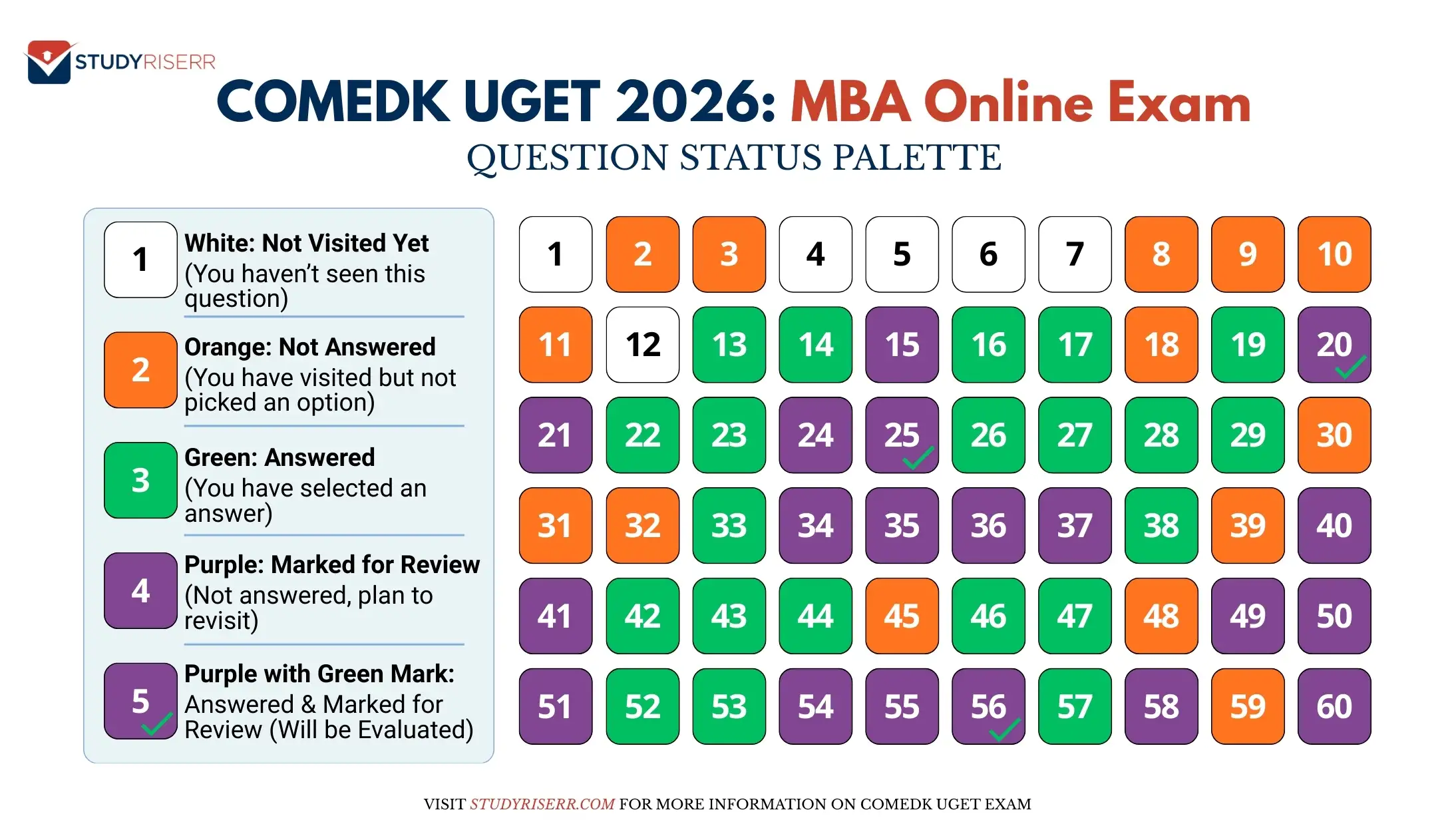
Only registered candidates can access these tests through their login portal, where they can practice navigating sections and monitoring their progress using the color-coded question palette. The marking scheme awards +1 mark per correct answer with no penalty for incorrect or unanswered questions, making the mock test an essential tool for mastering the English-medium, online exam.
How to Access the COMEDK UGET 2026 Mock Tests?
Follow these steps to take your COMEDK UGET online practice session:
- Step 1: Navigate to the website: comedk.org.
- Step 2: Locate and select the "Register/Login" option on the homepage.
- Step 3: Confirm that your registration is complete and the application fee has been processed.
- Step 4: Log into the candidate portal and click on the COMEDK UGET Mock Test link on the personal dashboard.
- Step 5: The system will auto-populate your login details as '11111'—simply hit "Sign In" to proceed.
- Step 6: Carefully read through the examination instructions displayed on the screen.
- Step 7: Check the declaration box to signify your agreement and click the "Next" button to start your examination.
Direct Link
How to Navigate COMEDK UGET 2026 Mock Test Exam Sections
The online interface is designed to mirror the actual exam environment. Check the navigating process below:
- Subject Tabs: Access Physics, Chemistry, or Mathematics via tabs at the top of the screen.
- Active Indicator: Your current subject is highlighted in dark blue.
- Auto-Transition: The system automatically moves to the next section upon completion.
- Free Navigation: Manually jump between sections or questions at any time during the 180-minute exam.
Online Examination Navigation Guide Tips
For those preparing for the COMEDK UGET 2026, here are the essential instructions to keep in mind:
| Feature/Action | Description & Method |
| Time Management | An on-screen countdown timer is always visible to show exactly how much time remains. |
| Status Tracking | Use the color-coded palette on the right to identify answered, skipped, or unvisited questions. |
| Change Subject | Click the subject name at the top of the screen to switch between Physics, Chemistry, and Mathematics. |
| Jump to Question | Click the specific question number in the right-side palette to navigate directly to it. |
| Save Progress | Click "Save & Next" after every selection to ensure your answer is locked into the system. |
| Mark for Review | Use the "Mark for Review" button to flag uncertain questions; you can return to these before final submission. |
Read Now:
- COMEDK UGET Registration 2026 (Ongoing): Dates, Direct Link & Application Process
- COMEDK Syllabus 2026: Subject-Wise Topics & Weightage and PDF for Phy, Chem and Math Preparations

Related News

Confused About Your Career?
Talk to an expert at Studyriserr






.png)





.jpg)

.webp)
.webp)

