


![Eminent College of Management & Technology [ECMT], Kolkata](https://studyriserr.com/images/logo/17129440651623749898Screenshot20210615145622.png)

![Jamnalal Bajaj Institute of Management Studies [JBIMS], Mumbai](https://studyriserr.com/images/logo/1708686935college logo.jpg)
![Swami Vivekananda University - [SVU], Kolkata](https://studyriserr.com/images/logo/17129450321679036648index.png)
![Surendra Institute of Engineering and Management [SIEM], Darjeeling](https://studyriserr.com/images/logo/17129440631437041019jpjpjpjpjp.jpg)
![SRM Institute of Science & Technology [SRM IST], Kattankulathur](https://studyriserr.com/images/logo/1702714835SRM Institute of Science & Technology Logo.png)




![IIM Bangalore [IIMB]](https://studyriserr.com/images/logo/1705405112IIMB Logo.jpg)
![Gargi Memorial Institute of Technology [GMIT], Kolkata](https://studyriserr.com/images/logo/17129440651459939108gmit.png)

![Jagannath Gupta Institute of Medical Sciences and Hospital [JIMSH], Kolkata](https://studyriserr.com/images/logo/17048037891652938202JagannathGuptaInstituteofMedicalSciencesandHospitalLogo.png)
![College of Engineering And Management [CEM], Kolaghat](https://studyriserr.com/images/logo/1712944057148854482644444.jpg)





Kalinga Institute of Industrial Technology (KIIT), Bhubaneswar, started the KIITEE 2026 registration process on November 10, 2025. The KIITEE 2026 Phase 5 application process is currently ongoing on the official website, kiitee.kiit.ac.in, and you can submit the application form. Candidates who wish to appear for the exam can now fill the application form online within the stipulated time limit.
There is no application fee for KIITEE 2026, and the registration process is divided into three separate stages. Before applying, students are advised to carefully check the eligibility criteria for their preferred course. At the time of registration, candidates are required to provide correct personal and academic details, as incorrect information can lead to the cancellation of their form.
The exam is conducted in online, center-based mode in multiple cities in India. After filling the form, candidates should download a copy of the confirmation page for future use.
Through this article, students will get to know all the important information related to KIITEE 2026 registration, including all the important dates, required documents and direct link to the application form and detailed steps to fill the application form. So read the entire article and complete the application very easily.
What Are the Important Dates for KIITEE 2026 Registration?
All important dates related to KIITEE 2026 registration are mentioned in detail in the table below.
| Events | Dates |
| KIITEE 2026 Application form release for Phase 1 | November 11, 2025 |
| Last date to apply for Phase 1 | April 8,2026 |
| Phase 1 exam dates | April 16 to 20, 2026 |
| Application form release for Phase 2 | April 2026 |
| Last date to apply for Phase 2 | May 30, 2026 |
| Phase 2 exam dates | June 4 to 8, 2026 |
| Application form release for Phase 3 | June 2026 |
| Last date to apply for Phase 3 | July 1, 2026 |
| Phase 3 exam dates (Revised) | July 3 to 4, 2026 |
| Phase 4 Registration open | 1st July , 2026 |
| Last date to apply for Phase 4 | 30th July 2026 |
| Phase 4 Exam Date | 1st August 2026 |
| Phase 5 Registration open | 3rd August 2026 |
| Last date to apply for Phase 4 | 28th August 2026 |
| Phase 5 Exam Date | 30th August 2026 |
Also Check: KIITEE 2026 Dates
How to Fill KIITEE 2026 Application Form?
Follow the guidelines below to fill the KIITEE 2026 application form on the official website.
- Step 1: Visit the official website - kiitee.kiit.ac.in
- Step 2: Click on "KIITEE 2026 Apply Now".
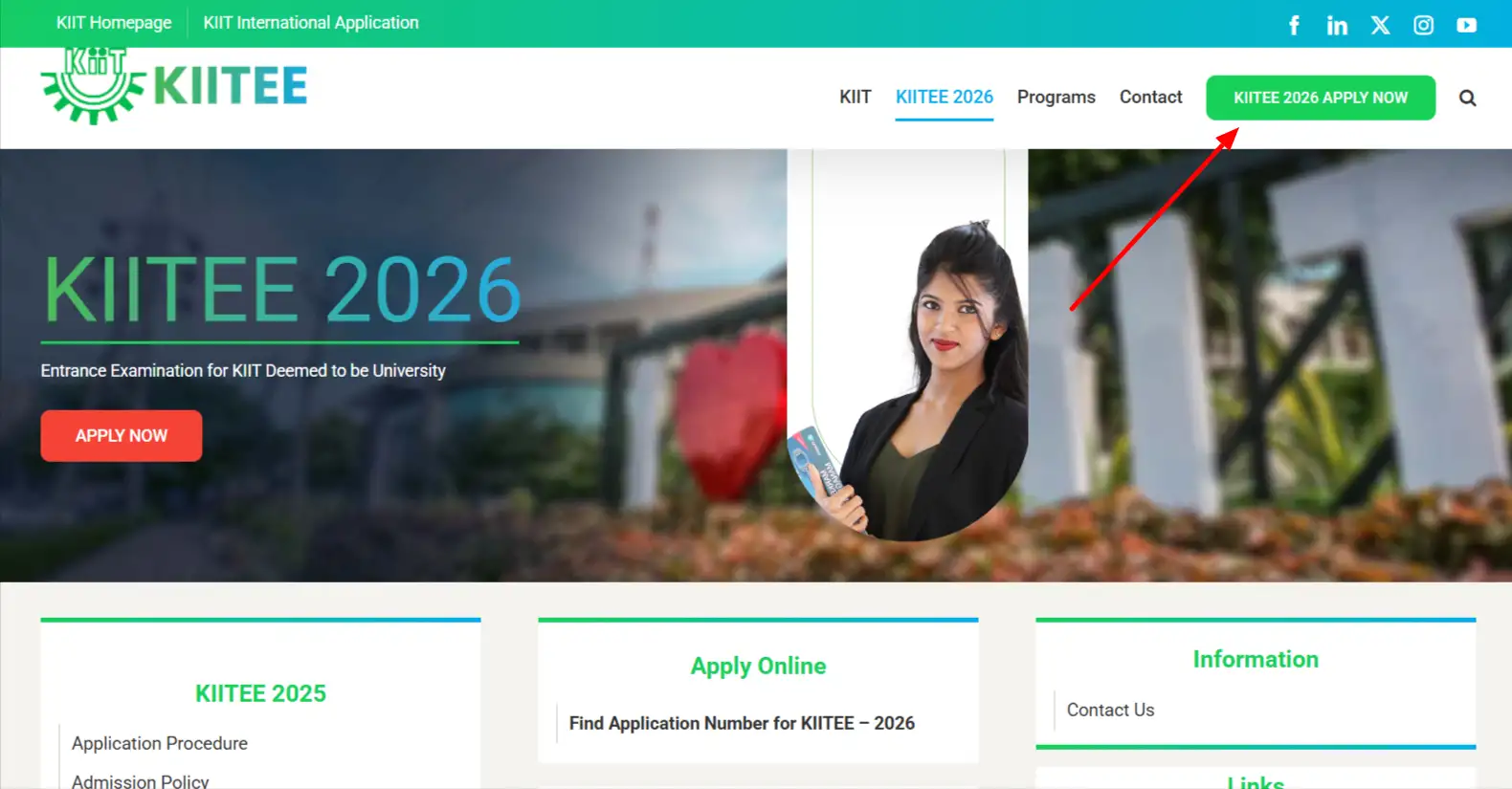
- Step 3: Select "New Registration".
- Step 4: Enter your mobile number, email ID, Aadhaar number, create a password and confirm it, then click on "Submit".
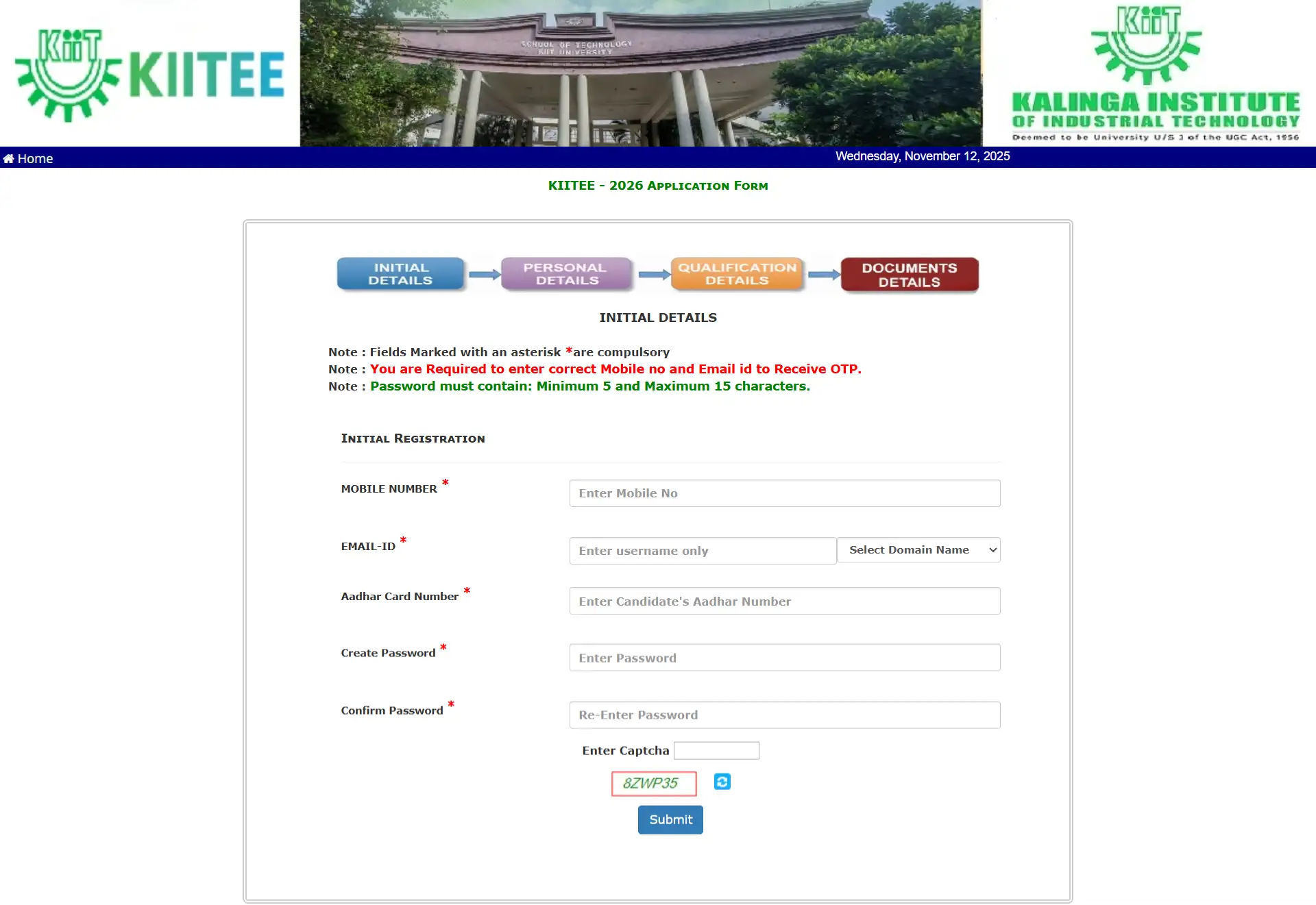
- Step 5: After registration, log in using your application number and password.

- Step 6: Fill in your personal, educational and contact details.
- Step 7: Upload your photograph, signature, and required documents.
- Step 8: Check all the details carefully, then submit the form and download/print the confirmation page.
Which Documents Are Required for the KIITEE 2026 Application Form?
Before starting KIITEE 2026 registration, make sure that you have all the required documents ready in the correct format. Having them ready in advance will help you fill the form quickly and without any errors.
The documents that you need while applying for KIITEE 2026 are as follows:
- A recent passport-sized photograph, scanned and uploaded in JPG format, with a file size of up to 50 KB.
- A scanned signature in JPG format, and the file size should also be within 50 KB.
- Marksheets or certificates of class 10th and 12th, which should be uploaded in JPG format and should not exceed 1 MB in size.
- A valid photo ID proof (such as an Aadhaar card, PAN card, voter ID, or passport).
- A category certificate (only if applicable to SC, ST, OBC, or PwD candidates).
- A valid email ID and mobile number for all future communications.
Before final submission, double-check that all uploaded files are clear and readable. If any documents are blurry or exceed the file limit, the system may reject the upload.
How Can You Re-login for Pending Document Upload in KIITEE 2026?
Candidates who were unable to upload their documents while filling the KIITEE 2026 application form can easily complete the process later by using the re-login facility.
The steps for uploading pending documents are detailed below:
- Visit the official website - kiitee.kiit.ac.in
- Click on the "Re-login / Upload Docs" link
- Enter your application number and date of birth
- Upload the remaining documents in the required JPG format and correct the file size
- Click on Submit to complete the upload process
Note: This feature allows candidates to update or upload documents without having to fill the form again, so that their KIITEE 2026 registration remains valid.
How to Recover KIITEE 2026 Application ID or Password?
Candidates who have forgotten their KIITEE 2026 Application ID or Password can recover it directly from the official KIITEE website. The process is simple and allows candidates to regain access to their application dashboard without any difficulty.
Follow the steps below to recover KIITEE login details easily:
- Visit the official KIITEE website - kiitee.kiit.ac.in
- On the homepage, click on the "Apply Now" tab and then select "Login"
- Choose the "Forgot Application Number / Password" option
- Enter the registered email ID and mobile number used during registration
- Click on "Submit"
- The application number or password reset link will be sent to the registered email address and mobile number
Note: Candidates are advised to keep a copy of their login credentials and confirmation page safely until the admission process is completed. This ensures easy access to admit cards, results, and other important updates later.
Before applying, check the KIITEE Eligibility Criteria 2026 to ensure you meet all the requirements.
Enjoy Extra Benefits with SR

Counselling

Processing fees on loan

Discounted Applications

GD PI preparation
Frequently Asked Questions
Before filling the KIITEE 2026 application form, candidates should check the eligibility requirements for their chosen course, which include age limit, minimum marks, and qualifying examination. Confirming the eligibility in advance helps prevent unnecessary rejection of KIITEE 2026 registration and allows candidates to focus on successfully submitted forms.
Example: If a candidate wants to apply for B.Tech in Computer Science, the candidate must have at least 60% in PCM in class 12th. Submitting the form without fulfilling these qualifications may lead to automatic rejection.
If candidates do not have their class 12th marksheet, they can submit a provisional certificate or marksheet to complete their KIITEE 2026 registration. Later, candidates will have to upload the final marks through the re-login document upload facility. This ensures that the application remains valid and prevents delays or cancellations.
Candidates can apply for multiple courses, but they will have to submit separate KIITEE 2026 application forms for each course. Personal details should be consistent across all applications to avoid errors in seat allotment or exam centre allocation.
Candidates should use a valid email ID and mobile number that can be accessed regularly. A strong password should be created and stored securely. This ensures smooth access to the KIITEE 2026 application, allows uploading of documents later if required, and helps candidates check the status of their application or download the admit card without any hassle.
Candidates must upload a recent, clear photo in JPG format and a scanned signature in JPG format. The file size must meet the limits (photo ≤50 KB, signature ≤50 KB). Following these requirements will prevent the KIITEE 2026 application form from being rejected due to incorrect document format or size.
Candidates should first check their internet connection and try using a desktop or laptop instead of a mobile device. Clearing the browser cache and trying to submit again may resolve the issue. If the error persists, candidates should contact KIITEE technical support. Submitting multiple times without resolving the issue may result in duplicate entries.
All important updates including confirmation of submission, document verification and release of admit card will be sent to the email ID and mobile number provided during registration. Candidates should check the information regularly so that they can stay informed and do not miss any deadline.
After submission, candidates can track the status of their KIITEE 2026 application online to ensure that all documents have been received and verified. Candidates need to log in to the official KIITEE website using their application number and password, then check the dashboard or “Application Form Status” section. If any document is pending, candidates should use the re-login facility to upload it before the deadline. It is advised to save a screenshot or printout of the status page for future reference.











.jpg )


.webp)
.webp)

