


![Swami Vivekananda Institute of Science and Technology [SVIST], Kolkata](https://studyriserr.com/images/logo/17129440551593506114download.jpg)





![Jamnalal Bajaj Institute of Management Studies [JBIMS], Mumbai](https://studyriserr.com/images/logo/1708686935college logo.jpg)

![Swami Vivekananda University - [SVU], Kolkata](https://studyriserr.com/images/logo/17129450321679036648index.png)
![Calcutta Institute of Engineering and Management [CIEM], Kolkata](https://studyriserr.com/images/logo/17129440681564398892ciem.jpg)
![Camellia Institute of Technology [CIT], Kolkata](https://studyriserr.com/images/logo/17129440541488523428Camelliait.jpg)






CLAT PG Registration 2026 has started from 1 August 2025 and closed on 7 November 11:59 PM and test location & detail correction had been open till 9 November 2025, 11:59 PM. Candidates who wish to join LLM after completing LLB course have to fill the application form online through the official website-consortiumofnlus.ac.in within the mentioned time limit.
Before starting CLAT PG Registration in 2026, you need to keep your personal details and academic details ready so that you can easily complete your registration without any hassle. And the registration fee for CLAT PG 2026 is INR.4000/- for General, OBC, candidates, and INR.3500/- for SC, ST, BPL, PWD Candidates.
In this article you will find all important details related to CLAT PG Registration 2026, including important dates, required documents, and how to register easily and also much more. So read the full article and know all details.
CLAT PG Registration Dates 2026 (Official)
CLAT PG Registration 2026 schedule is mentioned in the table below. Please check it out.
| Event | Important Dates (Tentative) |
| CLAT PG 2026 Notification Release | 20-21 July 2025 |
| Start of Online Registration | 1st August 2025 |
| Last Date to Submit Application Form | 7th November 2025 (Extended) |
| CLAT PG Admit Card Release | Last week of November 2025 |
| CLAT PG 2026 Exam Date | 7th December 2025 |
| CLAT PG 2026 Answer Key (Provisional) | Within 2 to 3 days after exam |
| Final Answer Key Release | Mid December 2025 |
| CLAT PG 2026 Result Declaration | End of December 2025 |
Required Documents for CLAT PG Registration 2026
Before filling the CLAT PG 2026 application form, it is very important for the candidates to keep some important documents ready. And it is also important to remember that all the documents should be clear and valid documents, because any wrong document can lead to rejection or problems during admission.
So, below is a list of the documents that you may need to complete the registration process smoothly:
Active Mobile Number and Email ID
- Your mobile number should be active and always contactable, as all important updates regarding your application will be sent there.
- Use an email ID that you check regularly. Confirmation mail and all others will be shared through email.
Marksheets of class 10th and 12th
- Keep scanned copies of your high school and higher secondary class marksheets ready.
- These are required to verify your primary educational background.
Law Degree and Scorecard
- You must have completed your LLB degree.
- Keep your final marksheets or certificate ready to prove your eligibility for CLAT PG.
Passport Size Photograph
- A recent, front-facing passport size photograph with a white background is required.
- Make sure it meets the size and format guidelines mentioned in the application form.
Scanned Signature
- Your signature should be scanned clearly and neatly.
- It will be uploaded during the form filling process.
Category Certificate (if applicable)
- SC, ST, or OBC category candidates must upload a valid certificate issued by the competent authority.
Disability Certificate (if applicable)
- If you fall under the category of persons with disabilities, keep your disability certificate ready.
BPL Certificate (if applicable)
Candidates applying under the Below Poverty Line category must provide a valid BPL certificate.
Also Check: CLAT PG Eligibility Criteria 2026
How to Register for CLAT PG 2026
The registration process for CLAT PG 2026 will be conducted online through the official website of the Consortium of National Law Universities - consortiumofnlus.ac.in.
For the convenience of the candidates who wish to apply, the details on how to complete the entire process with precision are given below.
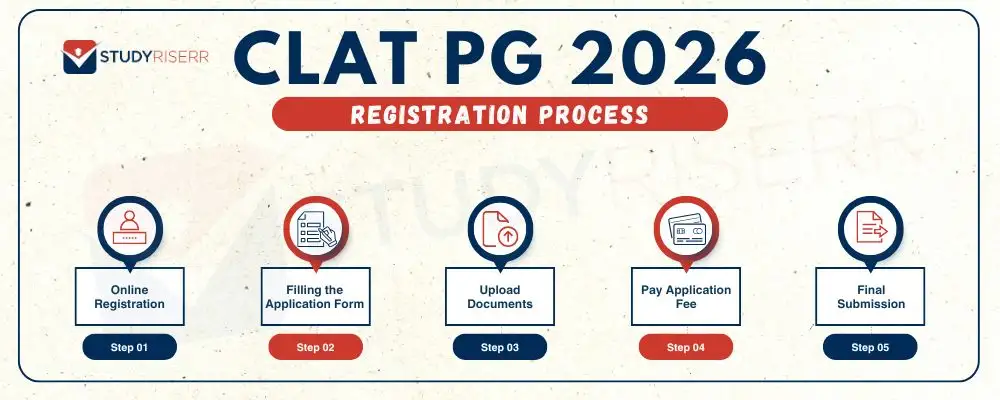
Step 1: Online Registration
- First, go to the official CLAT website- consortiumofnlus.ac.in
- Now, click the "New Register" button.
- Then a form will appear asking for your name, mobile number, email ID, and password.
- Fill in the details correctly and click on "Register".
After submitting this from:
- You will receive an OTP on your mobile number
- Enter the OTP to activate your account
- If the activation is successful, click on "OK" to proceed.
Step 2: Filling the Application Form
- Go to the homepage, and then you see in right side corner a login page, enter your mobile number and password then click on "Login".
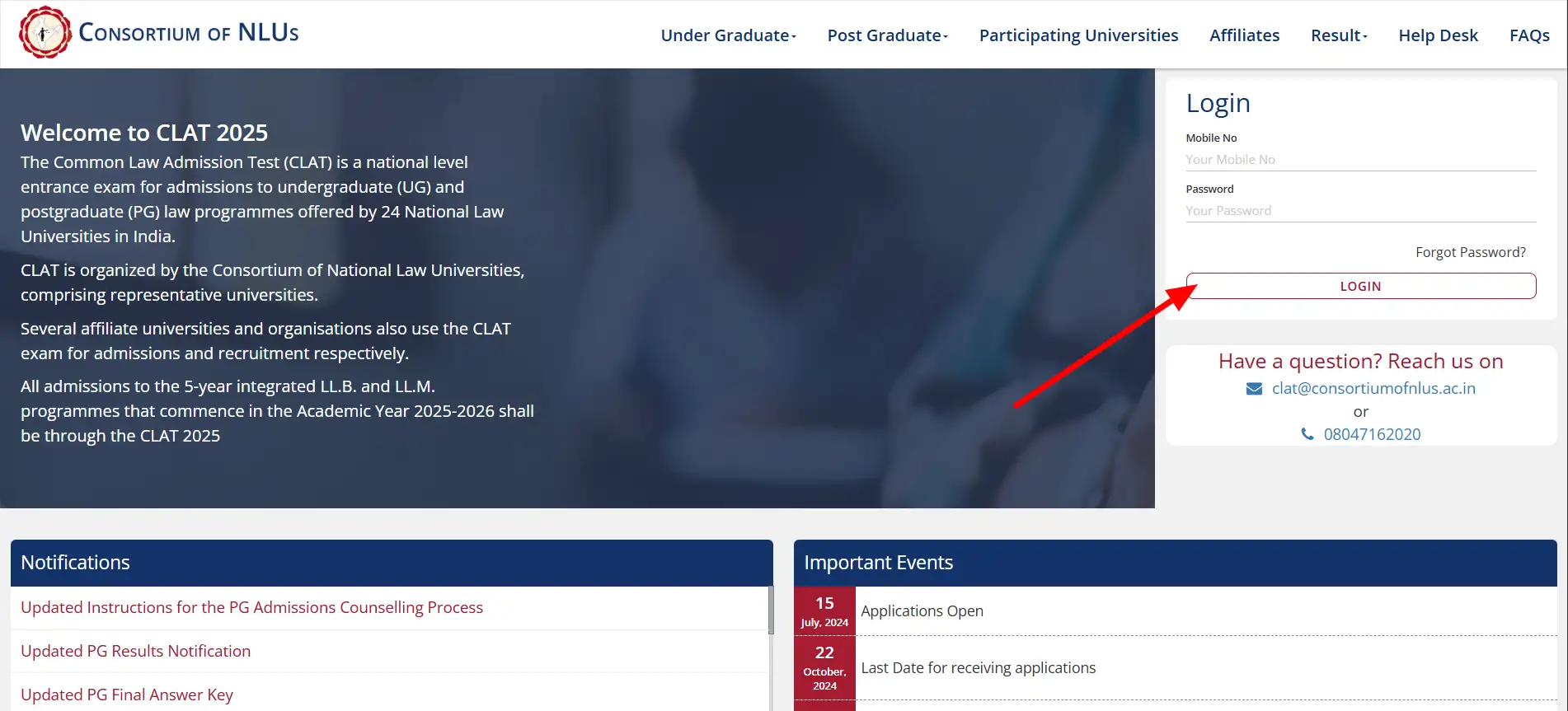
- After logging in select your course by clicking "PG"
- Then click on the "Apply for CLAT 2026"
- Then you have to fill in all the details that are mentioned in the application form. Like:
| Section | Information to be Filled |
| Personal Details | Full Name. Father's and Mother's Name. Date of Birth. Gender. Nationality. Category (General/ SC /ST/ OBC etc) . Mention if you are a PwD BPL or NRI Sponsored Candidate. |
| Contact Information | Communication Address. Permanent Address. State of Residence and Domicile. Pin Code. Valid Mobile Number. Active Email ID. |
| Educational Qualification | Class 10th 12th and LLB details. Name of Board or University. Year of Passing. Marks or Percentage Scored. Whether You Have Appeared or Passed. |
| Other Information | Whether You Need a Scribe. Whether You Wish to Purchase Previous Year's CLAT PG Papers (Yes or No). Exam Centre Preferences (Choose 3 Cities). NLU Preferences (Rank the NLUs According to Your Choice). |
Step 3: Upload Documents
Now, scan your photograph and signature clearly, and upload them following the official size and format guidelines.
You can check the table below for the exact specifications required.
| Document | Format |
| Passport size photograph | JPG/JPEG |
| Signature | JPG/JPEG |
| Category SC/ST/OBC/PWD/BPL certificate |
Step 4: Pay Application Fee
- After uploading the documents, the next step is to pay the application fee.
- Click on "Make Payment" and complete the process using debit card, credit card, net banking or UPI.
CLAT PG 2026 Application Fee:
| Category | Fee |
| General/OBC/NRI | 4000 |
| SC/ST/BPL/PWD | 3500 |
Note:
- You can also purchase the previous year CLAT PG question paper by paying an additional INR. 500/-
- Additional bank transaction charges may apply based on your payment method.
After successful payment:
- You'll get a confirmation receipt.
- You can also click "Edit Application" or "Delete Application" (if needed before final submission)
Step 5: Final Submission
After carefully reviewing all information, click "Submit" to complete your application.
What to Do If You Forget Your CLAT PG 2026 Password?
If you ever forget your CLAT PG 2026 login password, don't worry - it's easy to reset. Just follow these simple steps:
- Go to the official CLAT website - consortiumofnlus.ac.in
- On the login page, look for the "Forgot Password?" option and click on it.
- A new page will appear where you need to enter your registered mobile number.
- After entering your number, click on the "Request OTP"
- You will get a one-time password (OTP) on your mobile via SMS.
- Enter the OTP in the given field and set your new password.
- Re-enter the same password to confirm and click "Submit".
Mistake to Avoid While Filling CLAT PG 2026 Application Form
Filling the CLAT PG 2026 application form may seem easy, but a small mistake can create big problems later. To avoid last minute hassles, make sure to check the following points before submitting the form:
- Make sure that your name, date of birth and other personal details exactly match the information written in your official documents. Even a slight discrepancy can lead to disqualification.
- Be very careful while selecting your reservation category (General/OBC/SC/ST/PWD/BPL). If you belong to a reserved category, upload a correct and valid certificate issued by the competent authority.
- Your passport size photograph and signature should be clear, recent and as per government guidelines. Avoid using selfies, old photographs, or scanned images that are not clear.
- Don't forget to upload important documents like your law degree certificate, 10th/12th class marksheet, or department certificate (if applicable). If any document is missing, your application may get rejected.
- Once the test centre is selected, it cannot be changed. Choose your test cities wisely and make sure you can travel there easily.
- Sometimes, in a hurry, students forget to fill in certain fields. Always double-check each section before final submission.
- Submitting the form without making payment means your application will not be considered. Make sure the transaction is successful and don't forget to save the payment receipt.
Take a few extra minutes to review the entire form. Once submitted, you cannot edit most of the details.
Enjoy Extra Benefits with SR

Counselling

Processing fees on loan

Discounted Applications

GD PI preparation
Frequently Asked Questions
Ans: Yes, the CLAT Consortium allows a form correction window after the CLAT PG registration ends. During this time, candidates can make changes to limited fields like name spelling, uploaded documents, or category. However, crucial details like email ID, mobile number, or exam centre choice cannot be changed. So, before final submission of your CLAT PG application form, double-check all the details carefully.
Ans: Yes, while filling the CLAT PG 2026 application form, you must select three test cities based on your preference. This helps in smoother exam centre allotment. The Consortium tries to assign your first choice, but if unavailable, it may assign your second or third. Not selecting three preferences may lead to auto-allotment of any nearby city.
Ans: Though it's possible to complete the CLAT PG registration using a mobile phone, it's not recommended. For a smoother experience, especially while uploading documents or filling in educational details, use a laptop or desktop. The portal works better on larger screens and reduces the risk of technical errors in the application form.
Ans: Sometimes, due to technical issues, your CLAT PG 2026 application fee payment may be deducted but show as pending. In such cases, wait at least 24 hours. If the status still doesn't update, contact the CLAT Consortium helpdesk with your payment ID and transaction screenshot. Avoid making a second payment unless advised by the official support team.
Ans: After successful registration, a confirmation is usually sent via SMS or email. If you don’t see it, check your Spam or Promotions folder. Also, try logging in to your account using the registered number and password. If login fails, the registration might not have been successful — recheck or contact the CLAT PG helpdesk, [email protected] or phone- +91-8047165301 for further guidance.




.webp)
.webp)

