


![Syamaprasad Institute of Technology and Management [SITM], Kolkata](https://studyriserr.com/images/logo/17129440671685432251Screenshot20230530130331.jpg)
![Bankura Unnayani Institute of Engineering [BUIE], Bankura](https://studyriserr.com/images/logo/1725608843BUIE Logo.jpeg)
![Guru Nanak Institute of Technology [GNIT], Kolkata](https://studyriserr.com/images/logo/170480369616240103946483578416130722721606796901116776487059456n.jpg)

![Global Institute of Science and Technology - [GIST], Nadia](https://studyriserr.com/images/logo/17129440661488628291c321e09e068c6ac2956042241987f838Logoyfv1hi9.jpg)





![Haldia Institute of Technology [HIT], Haldia](https://studyriserr.com/images/logo/1704802367Haldia Institute of Technology Haldia logo.png)
![Institute of Business Management & Research [IBMR], Kolkata](https://studyriserr.com/images/logo/17129440611501765291148497692555868l.jpg)



SRM University, Andhra Pradesh (SRM AP) has a dedicated portal to access to the digital ecosystem for monitoring progress and obtaining administrative updates. Candidate authentication is mandatory for newly admitted applicants to verify their SRMJEEE 2026 results, as well as already course pursuing students to review their academic performance.
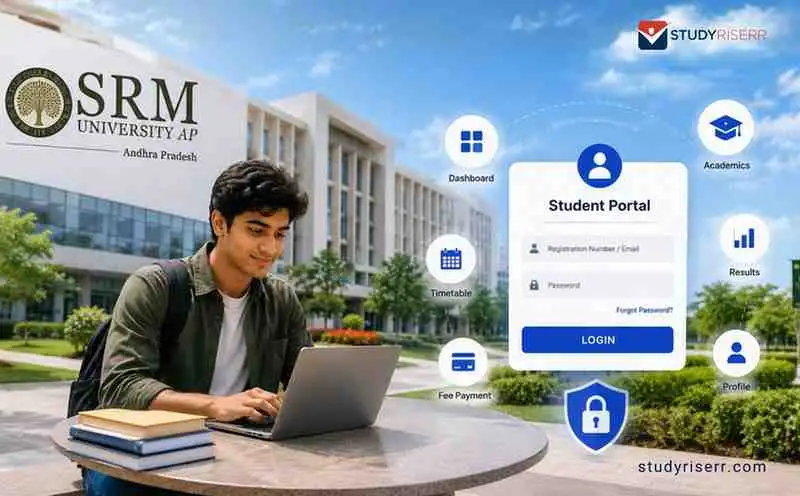
To manage administrative workflows across the campus infrastructure and residential facilities, the SRM University – AP divides its login interfaces into distinct portals for academic records, housing, and career services. Check out our whole article that provides the official URLs, access steps, and fundamental troubleshooting methods to manage your student account.
SRM University AP Login: New Applicants & Freshers Admission Portal
If you are applying for admission to various courses at SRM University for the first time, tracking your admission status, or downloading your Provisional Admission Letter, you must follow these steps:
- Official Portals: Visit the SRM Online Admission Portal or the SRM AP Undergraduate Application Page.
- Log-in Username: Enter your unique Application Number generated during your registration.
- Default Password: Use your Date of Birth in the exact format DDMMYYYY. Do not include any slashes, hyphens, or spaces.
- Security Step: Enter the displayed Captcha code and authenticate using the One-Time Password (OTP) sent to your registered mobile number or email ID.

Source: Official SRM University AP Login
CAP Portal Capabilities via SRM University AP Login
The SRM AP online portal provides essential administrative tools to help you manage your enrollment and academic milestones. Through the dashboard, you can complete the following actions:
- Track Results & Intake: Monitor your national admission status and view your SRMJEEE 2026 examination scores.
- Manage Counseling: Complete your official counseling registration and securely upload your required academic documents.
- Process Payments: Securely pay your academic tuition, seat-reservation fees, or counseling registration charges.
SRM University AP Login: Continuing & Senior Students Portal (ERP)
For registered, senior students checking timetables, internal marks, course registrations, or attendance, the university operates two distinct internal networks.
The Unified Student Portal
- Official Link: Visit the SRM AP Student Portal.
- Access Credentials: Log in using your university-assigned Registration Number (or your official student institutional email address) and your secure custom password.
- Key Actions Available: View daily class timetables, check semester end-examination results, and monitor live attendance percentages.
The e-Varsity Backbone ERP
- Official Link: Access the SRM AP Student Corner ERP / e-Varsity Portal.
- Access Credentials: Use your official student institutional credentials.
- Key Actions Available: Register for semester courses, manage hostel room configurations, opt for university transport allocation, and view detailed digital fee receipts.
On-The-Go Access
Students looking to access their profiles from a mobile browser or smart device can use the cloud-optimized mobile interface.
- Official Link: Access the cloud framework at CONNECT SRMAP.
- Access Credentials: Enter your verified student Username or registered institutional email address alongside your secure password.
Troubleshooting Common SRM University AP Login Failures
If you encounter errors while logging into any of the SRM AP platforms, check these common fixes before reaching out to support:
- Incorrect Password Format: For default passwords, always omit punctuation. Use 12102004, never 12-10-2004 or 12/10/2004.
- Missing OTP: If the verification OTP does not hit your primary email inbox within 5 minutes, carefully check your Spam or Junk email folders.
- Locked Account: If your account is temporarily locked due to multiple failed attempts, clear your browser’s cache, wait 15 minutes, and try again.
Official Helpdesk for SRM University AP Login Issues
If you face persistent authentication errors or systemic profile issues, you can reach out directly to the technical and administrative teams.
Central Support Desk for SRM AP Login
- Central Admission Helpline: 080-6988-6999 or +91-863-2343000
- General Admission Desk Email: [email protected]
- IT & ERP Support Email: [email protected]
Executive Escalations
For complex account restrictions that cannot be resolved by the standard helpdesk, you can contact the leadership office directly:
| Office / Department | Contact Person | Email Address | Telephone Number |
| Registrar Office | Dr. R Premkumar | [email protected] | 0863-2343535 |
| Director of Admissions | Prof. Y Siva Sankar | [email protected] | 0863-2343097 |
| Director of ITKM | Dr. Satish Anamalamudi | [email protected] | 0863-2343019 |
To track live events at SRM University AP campus, click here.

Related News





Confused About Your Career?
Talk to an expert at Studyriserr






.png)





.jpg)

.webp)
.webp)

